
2.4: Electronic Mail in the Internet
| Along with
the Web, electronic mail is one of the most popular Internet applications.
Just like ordinary "snail mail," e-mail is asynchronous--people send and
read messages when it is convenient for them, without having to coordinate
with other peoples' schedules. In contrast with snail mail, electronic
mail is fast, easy to distribute, and inexpensive. Moreover, modern electronic
mail messages can include hyperlinks, HTML formatted text, images, sound,
and even video. In this section we will examine the application-layer protocols
that are at the heart of Internet electronic mail. But before we jump into
an in-depth discussion of these protocols, let's take a bird's eye view
of the Internet mail system and its key components.
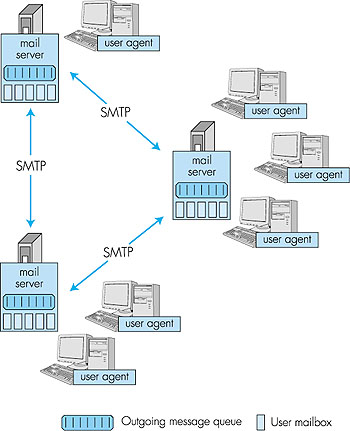
Figure 2.15 presents a high-level view of the Internet mail system. We see from this diagram that it has three major components: user agents, mail servers, and the Simple Mail Transfer Protocol (SMTP). We now describe each of these components in the context of a sender, Alice, sending an e-mail message to a recipient, Bob. User agents allow users to read, reply to, forward, save, and compose messages. (User agents for electronic mail are sometimes called mail readers, although we will generally avoid this term in this book.) When Alice is finished composing her message, her user agent sends the message to her mail server, where the message is placed in the mail server's outgoing message queue. When Bob wants to read a message, his user agent obtains the message from his mailbox in his mail server. In the late 1990s, GUI (graphical user interface) user agents became popular, allowing users to view and compose multimedia messages. Currently, Eudora, Microsoft's Outlook, and Netscape's Messenger are among the popular GUI user agents for e-mail. There are also many text-based e-mail user interfaces in the public domain, including mail, pine, and elm.
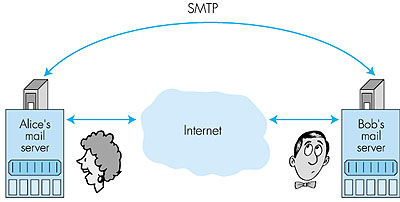
Mail servers form the core of the e-mail infrastructure. Each recipient, such as Bob, has a mailbox located in one of the mail servers. Bob's mailbox manages and maintains the messages that have been sent to him. A typical message starts its journey in the sender's user agent, travels to the sender's mail server, and then travels to the recipient's mail server, where it is deposited in the recipient's mailbox. When Bob wants to access the messages in his mailbox, the mail server containing the mailbox authenticates Bob (with user names and passwords). Alice's mail server must also deal with failures in Bob's mail server. If Alice's server cannot deliver mail to Bob's server, Alice's server holds the message in a message queue and attempts to transfer the message later. Reattempts are often done every 30 minutes or so; if there is no success after several days, the server removes the message and notifies the sender (Alice) with an e-mail message. The Simple Mail Transfer Protocol (SMTP) is the principal application-layer protocol for Internet electronic mail. It uses the reliable data transfer service of TCP to transfer mail from the sender's mail server to the recipient's mail server. As with most application-layer protocols, SMTP has two sides: a client side, which executes on the sender's mail server, and a server side, which executes on the recipient's mail server. Both the client and server sides of SMTP run on every mail server. When a mail server sends mail (to other mail servers), it acts as an SMTP client. When a mail server receives mail (from other mail servers) it acts as an SMTP server.
2.4.1: SMTPSMTP, defined in RFC 821, is at the heart of Internet electronic mail. As mentioned above, SMTP transfers messages from senders' mail servers to the recipients' mail servers. SMTP is much older than HTTP. (The SMTP RFC dates back to 1982, and SMTP was around long before that.) Although SMTP has numerous wonderful qualities, as evidenced by its ubiquity in the Internet, it is nevertheless a legacy technology that possesses certain "archaic" characteristics. For example, it restricts the body (not just the headers) of all mail messages to be in simple seven-bit ASCII. This restriction made sense in the early 1980s when transmission capacity was scarce and no one was e-mailing large attachments or large image, audio, or video files. But today, in the multimedia era, the seven-bit ASCII restriction is a bit of a pain--it requires binary multimedia data to be encoded to ASCII before being sent over SMTP; and it requires the corresponding ASCII message to be decoded back to binary after SMTP transport. Recall from Section 2.3 that HTTP does not require multimedia data to be ASCII encoded before transfer.To illustrate the basic operation of SMTP, let's walk through a common scenario. Suppose Alice wants to send Bob a simple ASCII message:
It is important to observe that SMTP does not normally use intermediate mail servers for sending mail, even when the two mail servers are located at opposite ends of the world. If Alice's server is in Hong Kong and Bob's server is in Mobile, Alabama, the TCP "connection" is a direct connection between the Hong Kong and Mobile servers. In particular, if Bob's mail server is down, the message remains in Alice's mail server and waits for a new attempt--the message does not get placed in some intermediate mail server. Let's now take a closer look at how SMTP transfers a message from a sending mail server to a receiving mail server. We will see that the SMTP protocol has many similarities with protocols that are used for face-to-face human interaction. First, the client SMTP (running on the sending mail server host) has TCP establish a connection on port 25 to the server SMTP (running on the receiving mail server host). If the server is down, the client tries again later. Once this connection is established, the server and client perform some application-layer handshaking. Just as humans often introduce themselves before transferring information from one to another, SMTP clients and servers introduce themselves before transferring information. During this SMTP handshaking phase, the SMTP client indicates the e-mail address of the sender (the person who generated the message) and the e-mail address of the recipient. Once the SMTP client and server have introduced themselves to each other, the client sends the message. SMTP can count on the reliable data transfer service of TCP to get the message to the server without errors. The client then repeats this process over the same TCP connection if it has other messages to send to the server; otherwise, it instructs TCP to close the connection. Let us take a look at an example transcript between client (C) and server (S). The host name of the client is crepes.fr and the host name of the server is hamburger.edu. The ASCII text lines prefaced with C: are exactly the lines the client sends into its TCP socket, and the ASCII text lines prefaced with S: are exactly the lines the server sends into its TCP socket. The following transcript begins as soon as the TCP connection is established: S: 220 hamburger.edu C: HELO crepes.fr S: 250 Hello crepes.fr, pleased to meet you C: MAIL FROM: <alice@crepes.fr> S: 250 alice@crepes.fr... Sender ok C: RCPT TO: <bob@hamburger.edu> S: 250 bob@hamburger.edu ... Recipient ok C: DATA S: 354 Enter mail, end with "." on a line by itself C: Do you like ketchup? C: How about pickles? C: . S: 250 Message accepted for delivery C: QUIT S: 221 hamburger.edu closing connectionIn the above example, the client sends a message ("Do you like ketchup? How about pickles?") from mail server crepes.fr to mail server hamburger.edu. The client issued five commands: HELO (an abbreviation for HELLO), MAIL FROM, RCPT TO, DATA, and QUIT. These commands are self explanatory. The server issues replies to each command, with each reply having a reply code and some (optional) English-language explanation. We mention here that SMTP uses persistent connections: If the sending mail server has several messages to send to the same receiving mail server, it can send all of the messages over the same TCP connection. For each message, the client begins the process with a new HELO crepes.fr and only issues QUIT after all messages have been sent. It is highly recommended that you use Telnet to carry out a direct dialogue with an SMTP server. To do this, issue telnet serverName 25 where serverName is the name of the remote mail server. When you do this, you are simply establishing a TCP connection between your local host and the mail server. After typing this line, you should immediately receive the 220 reply from the server. Then issue the SMTP commands HELO, MAIL FROM, RCPT TO, DATA, and QUIT at the appropriate times. If you Telnet into your friend's SMTP server, you should be able to send mail to your friend in this manner (that is, without using your mail user agent). 2.4.2: Comparison with HTTPLet us now briefly compare SMTP to HTTP. Both protocols are used to transfer files from one host to another; HTTP transfers files (or objects) from Web server to Web user agent (that is, the browser); SMTP transfers files (that is, e-mail messages) from one mail server to another mail server. When transferring the files, both persistent HTTP and SMTP use persistent connections. Thus, the two protocols have common characteristics. However, there are important differences. First, HTTP is principally a pull protocol--someone loads information on a Web server and users use HTTP to pull the information from the server at their convenience. In particular, the TCP connection is initiated by the machine that wants to receive the file. On the other hand, SMTP is primarily a push protocol--the sending mail server pushes the file to the receiving mail server. In particular, the TCP connection is initiated by the machine that wants to send the file.A second important difference, which we alluded to earlier, is that SMTP requires each message, including the body of each message, to be in seven-bit ASCII format. Furthermore, the SMTP RFC requires the body of every message to end with a line consisting of only a period--that is, in ASCII jargon, the body of each message ends with "CRLF.CRLF," where CR and LF stand for carriage return and line feed, respectively. In this manner, while the SMTP server is receiving a series of messages from an SMTP client, the server can delineate the messages by searching for "CRLF.CRLF" in the byte stream. Now suppose that the body of one of the messages is not ASCII text but instead binary data (for example, a JPEG image). It is possible that this binary data might accidentally have the bit pattern associated with ASCII representation of "CRLF.CRLF" in the middle of the bit stream. This would cause the SMTP server to incorrectly conclude that the message has terminated. To get around this and related problems, binary data is first encoded to ASCII in such a way that certain ASCII characters (including " . ") are not used. Returning to our comparison with HTTP, we note that neither nonpersistent nor persistent HTTP has to bother with the ASCII conversion. For nonpersistent HTTP, each TCP connection transfers exactly one object; when the server closes the connection, the client knows it has received one entire response message. For persistent HTTP, each response message includes a Content-length: header line, enabling the client to delineate the end of each message. A third important difference concerns how a document consisting of text and images (along with possibly other media types) is handled. As we learned in Section 2.3, HTTP encapsulates each object in its own HTTP response message. Internet mail, as we shall discuss in greater detail below, places all of the message's objects into one message. 2.4.3: Mail Message Formats and MIMEWhen Alice sends an ordinary snail-mail letter to Bob, she puts the letter into an envelope, on which there are all kinds of peripheral information such as Bob's address, Alice's return address, and the date (supplied by the postal service). Similarly, when an e-mail message is sent from one person to another, a header containing peripheral information precedes the body of the message itself. This peripheral information is contained in a series of header lines, which are defined in RFC 822. The header lines and the body of the message are separated by a blank line (that is, by CRLF). RFC 822 specifies the exact format for mail header lines as well as their semantic interpretations. As with HTTP, each header line contains readable text, consisting of a keyword followed by a colon followed by a value. Some of the keywords are required and others are optional. Every header must have a From: header line and a To: header line; a header may include a Subject: header line as well as other optional header lines. It is important to note that these header lines are different from the SMTP commands we studied in Section 2.4.1 (even though they contain some common words such as "from" and "to"). The commands in that section were part of the SMTP handshaking protocol; the header lines examined in this section are part of the mail message itself.A typical message header looks like this: From: alice@crepes.fr To: bob@hamburger.edu Subject: Searching for the meaning of life.After the message header, a blank line follows, then the message body (in ASCII) follows. The message terminates with a line containing only a period, as discussed above. You should use Telnet to send to a mail server a message that contains some header lines, including the Subject: header line. To do this, issue telnet serverName 25. The MIME Extension for Non-ASCII Data While the message headers described in RFC 822 are satisfactory for sending ordinary ASCII text, they are not sufficiently rich enough for multimedia messages (for example, messages with images, audio, and video) or for carrying non-ASCII text formats (for example, characters used by languages other than English). To send content different from ASCII text, the sending user agent must include additional headers in the message. These extra headers are defined in RFC 2045 and RFC 2046, the MIME (Multipurpose Internet Mail Extensions) extension to RFC 822. Two key MIME headers for supporting multimedia are the Content-Type: header and the Content-Transfer-Encoding: header. The Content-Type: header allows the receiving user agent to take an appropriate action on the message. For example, by indicating that the message body contains a JPEG image, the receiving user agent can direct the message body to a JPEG decompression routine. To understand the need of the Content-Transfer-Encoding: header, recall that non-ASCII text messages must be encoded to an ASCII format that isn't going to confuse SMTP. The Content-Transfer-Encoding: header alerts the receiving user agent that the message body has been ASCII-encoded and to the type of encoding used. Thus, when a user agent receives a message with these two headers, it first uses the value of the Content-Transfer-Encoding: header to convert the message body to its original non-ASCII form, and then uses the Content-Type: header to determine what actions it should take on the message body. Let's take a look at a concrete example. Suppose Alice wants to send Bob a JPEG image. To do this, Alice invokes her user agent for e-mail, specifies Bob's e-mail address, specifies the subject of the message, and inserts the JPEG image into the message body of the message. (Depending on the user agent Alice uses, she might insert the image into the message as an "attachment.") When Alice finishes composing her message, she clicks on "Send." Alice's user agent then generates a MIME message, which might look something like this: From: alice@crepes.fr To: bob@hamburger.edu Subject: Picture of yummy crepe. MIME-Version: 1.0 Content-Transfer-Encoding: base64 Content-Type: image/jpeg (base64 encoded data ..... ......................... ......base64 encoded data)We observe from the above MIME message that Alice's user agent encoded the JPEG image using base64 encoding. This is one of several encoding techniques standardized in the MIME [RFC 2045] for conversion to an acceptable seven-bit ASCII format. Another popular encoding technique is quoted-printable content-transfer-encoding, which is typically used to convert an ordinary ASCII message to ASCII text void of undesirable character strings (for example, a line with a single period). When Bob reads his mail with his user agent, his user agent operates on this same MIME message. When Bob's user agent observes the Content-Transfer- Encoding: base64 header line, it proceeds to decode the base64-encoded message body. The message also includes a Content-Type: image/jpeg header line; this indicates to Bob's user agent that the message body should be JPEG decompressed. Finally, the message includes the MIME-Version: header, which, of course, indicates the MIME version that is being used. Note that the message otherwise follows the standard RFC 822/SMTP format. In particular, after the message header there is a blank line and then the message body; and after the message body, there is a line with a single period. Let's now take a closer look at the Content-Type: header. According to the MIME specification [RFC 2046], this header has the following format: Content-Type: type/subtype; parameters where the "parameters" (along with the semicolon) is optional. Paraphrasing [RFC 2046], the Content-Type field is used to specify the nature of the data in the body of a MIME entity, by giving media type and subtype names. After the type and subtype names, the remainder of the header field consists of a set of parameters. In general, the top-level type is used to declare the general type of data, whereas the subtype specifies a specific format for that type of data. The parameters are modifiers of the subtype and as such do not fundamentally affect the nature of the content. The set of meaningful parameters depends on the type and subtype. Most parameters are associated with a single specific subtype. MIME has been carefully designed to be extensible, and it is expected that the set of media type/subtype pairs and their associated parameters will grow significantly over time. In order to ensure that the set of such types/subtypes is developed in an orderly, well-specified, and public manner, MIME sets up a registration process that uses the Internet Assigned Numbers Authority (IANA) as a central registry for MIME's various areas of extensibility. The registration process for these areas is described in RFC 2048. Currently there are seven top-level types defined. For each type, there is a list of associated subtypes, and the lists of subtypes are growing every year. We describe five of these types below:
To obtain a better understanding of multipart/mixed, let's look at an example. Suppose that Alice wants to send a message to Bob consisting of some ASCII text, followed by a JPEG image, followed by more ASCII text. Using her user agent, Alice types some text, attaches a JPEG image, and then types some more text. Her user agent then generates a message something like this: From: alice@crepes.fr To: bob@hamburger.edu Subject: Picture of yummy crepe with commentary MIME-Version: 1.0 Content-Type: multipart/mixed; Boundary=StartOfNextPart --StartOfNextPart Dear Bob, Please find a picture of an absolutely scrumptious crepe. --StartOfNextPart Content-Transfer-Encoding: base64 Content-Type: image/jpeg base64 encoded data ..... ......................... ......base64 encoded data --StartOfNextPart Let me know if you would like the recipe.Examining the above message, we note that the Content-Type: line in the header indicates how the various parts in the message are separated. The separation always begins with two dashes and ends with CRLF. The Received Message As we have discussed, an e-mail message consists of many components. The core of the message is the message body, which is the actual data being sent from sender to receiver. For a multipart message, the message body itself consists of many parts, with each part preceded by one or more lines of identifying information. Preceding the message body is a blank line and then a number of header lines. These header lines include RFC 822 header lines such as From:, To:, and Subject: header lines. The header lines also include MIME header lines such as Content-type: and Content-transfer-encoding: header lines. But we would be remiss if we didn't mention another class of header lines that are inserted by the SMTP receiving server. Indeed, the receiving server, upon receiving a message with RFC 822 and MIME header lines, appends a Received: header line to the top of the message; this header line specifies the name of the SMTP server that sent the message ("from"), the name of the SMTP server that received the message ("by") and the time at which the receiving server received the message. Thus, the message seen by the destination user takes the following form: Received: from crepes.fr by hamburger.edu; 12 Oct 98 15:27:39 GMT From: alice@crepes.fr To: bob@hamburger.edu Subject: Picture of yummy crepe. MIME-Version: 1.0 Content-Transfer-Encoding: base64 Content-Type: image/jpeg base64 encoded data ....... ........................................ .......base64 encoded dataAlmost everyone who has used electronic mail has seen the Received: header line (along with the other header lines) preceding e-mail messages. (This line is often directly seen on the screen or when the message is sent to a printer.) You may have noticed that a single message sometimes has multiple Received: header lines and a more complex Return-Path: header line. This is because a message may be forwarded to more than one SMTP server in the path between sender and recipient. For example, if Bob has instructed his e-mail server hamburger.edu to forward all his messages to sushi.jp, then the message read by Bob's user agent would begin with something like: Received: from hamburger.edu by sushi.jp; 12 Oct 98 15:30:01 GMT Received: from crepes.fr by hamburger.edu; 12 Oct 98 15:27:39 GMTThese header lines provide the receiving user agent a trace of the SMTP servers visited as well as timestamps of when the visits occurred. You can learn more about the syntax of these header lines in the SMTP RFC, which is one of the more readable of the many RFCs. 2.4.4: Mail Access ProtocolsOnce SMTP delivers the message from Alice's mail server to Bob's mail server, the message is placed in Bob's mailbox. Throughout this discussion we have tacitly assumed that Bob reads his mail by logging onto the server host and then executes a mail reader directly on that host. Up until the early 1990s this was the standard way of doing things. But today a typical user reads mail with a user agent that executes on his or her local PC (or Mac), whether that PC be an office PC, a home PC, or a portable PC. By executing the user agent on a local PC, users enjoy a rich set of features, including the ability to view multimedia messages and attachments.Given that Bob (the recipient) executes his user agent on his local PC, it is natural to consider placing a mail server on his local PC as well. There is a problem with this approach, however. Recall that a mail server manages mailboxes and runs the client and server sides of SMTP. If Bob's mail server were to reside on his local PC, then Bob's PC would have to remain constantly on, and connected to the Internet, in order to receive new mail, which can arrive at any time. This is impractical for the great majority of Internet users. Instead, a typical user runs a user agent on the local PC but accesses a mailbox from a shared mail server--a mail server that is always connected to the Internet, and that is shared with other users. The mail server is typically maintained by the user's ISP (e.g., university or company). With user agents running on users' local PCs and mail servers hosted by ISPs or institutional networks, a protocol is needed to allow the user agent and the mail server to communicate. Let us first consider how a message that originates at Alice's local PC makes its way to Bob's SMTP mail server. This task could simply be done by having Alice's user agent communicate directly with Bob's mail server in the language of SMTP. Alice's user agent would initiate a TCP connection to Bob's mail server, issue the SMTP handshaking commands, upload the message with the DATA command, and then close the connection. This approach, although perfectly feasible, is not commonly employed, primarily because it doesn't offer Alice's user agent any recourse to a crashed destination mail server. Instead, Alice's user agent initiates a SMTP dialogue to upload Alice's message to her own mail server (rather than with the recipient's mail server). Alice's mail server then establishes a new SMTP session with Bob's mail server and relays the message to Bob's mail server. If Bob's mail server is down, then Alice's mail server holds the message and tries again later. The SMTP RFC defines how the SMTP commands can be used to relay a message across multiple SMTP servers. But there is still one missing piece to the puzzle! How does a recipient like Bob, running a user agent on his local PC, obtain his messages, which are sitting on a mail server within Bob's ISP? The puzzle is completed by introducing a special mail access protocol that transfers messages from Bob's mail server to his local PC. There are currently two popular mail access protocols: POP3 (Post Office Protocol-- Version 3) and IMAP (Internet Mail Access Protocol). We shall discuss both of these protocols below. Note that Bob's user agent can't use SMTP to obtain the messages because obtaining the messages is a pull operation whereas SMTP is a push protocol. Figure 2.17 provides a summary of the protocols that are used for Internet mail: SMTP is used to transfer mail from the sender's mail server to the recipient's mail server; SMTP is also used to transfer mail from the sender's user agent to the sender's mail server. POP3 or IMAP are used to transfer mail from the recipient's mail server to the recipient's user agent.
POP3 POP3, defined in RFC 1939, is an extremely simple mail access protocol. Because the protocol is so simple, its functionality is rather limited. POP3 begins when the user agent (the client) opens a TCP connection to the mail server (the server) on port 110. With the TCP connection established, POP3 progresses through three phases: authorization, transaction, and update. During the first phase, authorization, the user agent sends a user name and a password to authenticate the user downloading the mail. During the second phase, transaction, the user agent retrieves messages. During the transaction phase, the user agent can also mark messages for deletion, remove deletion marks, and obtain mail statistics. The third phase, update, occurs after the client has issued the quit command, ending the POP3 session; at this time, the mail server deletes the messages that were marked for deletion. In a POP3 transaction, the user agent issues commands, and the server responds to each command with a reply. There are two possible responses: +OK (sometimes followed by server-to-client data), whereby the server is saying that the previous command was fine; and -ERR, whereby the server is saying that something was wrong with the previous command. The authorization phase has two principle commands: user <user name> and pass <password>. To illustrate these two commands, we suggest that you Telnet directly into a POP3 server, using port 110, and issue these commands. Suppose that mailServer is the name of your mail server. You will see something like: telnet mailServer 110 +OK POP3 server ready user alice +OK pass hungry +OK user successfully logged onIf you misspell a command, the POP3 server will reply with an -ERR message. Now let's take a look at the transaction phase. A user agent using POP3 can often be configured (by the user) to "download and delete" or to "download and keep." The sequence of commands issued by a POP3 user agent depend on which of these two modes the user agent is operating in. In the download-and-delete mode, the user agent will issue the list, retr, and dele commands. As an example, suppose the user has two messages in his or her mailbox. In the dialogue below, C: (standing for client), is the user agent and S: (standing for server) is the mail server. The transaction will look something like: C: list S: 1 498 S: 2 912 S: . C: retr 1 S: (blah blah ... S: ................. S: ..........blah) S: . C: dele 1 C: retr 2 S: (blah blah ... S: ................. S: ..........blah) S: . C: dele 2 C: quit S: +OK POP3 server signing offThe user agent first asks the mail server to list the size of each of the stored messages. The user agent then retrieves and deletes each message from the server. Note that after the authorization phase, the user agent employed only four commands: list, retr, dele, and quit. The syntax for these commands is defined in RFC 1939. After processing the quit command, the POP3 server enters the update phase and removes messages 1 and 2 from the mailbox. A problem with this download-and-delete mode is that the recipient, Bob, may be nomadic and want to access his mail from multiple machines, including the office PC, the home PC, and a portable computer. The download-and-delete mode scatters Bob's mail over all of his machines; in particular, if Bob first reads a message on a home PC, he will not be able to reread the message on his portable later in the evening. In the download-and-keep mode, the user agent leaves the messages on the mail server after downloading them. In this case, Bob can reread messages from different machines; he can access a message from work, and then access it again later in the week from home. During a POP3 session between a user agent and the mail server, the POP3 server maintains some state information; in particular, it keeps track of which messages have been marked deleted. However, the POP3 server does not carry state information across POP3 sessions. For example, no message is marked for deletion at the beginning of each session. This lack of state information across sessions greatly simplifies the implementation of a POP3 server. IMAP Once Bob has downloaded his messages to the local machine using POP3, he can create mail folders and move the downloaded messages into the folders. Bob can then delete messages, move messages across folders, and search for messages (by sender name or subject). But this paradigm--folders and messages in the local machine--poses a problem for the nomadic user, who would prefer to maintain a folder hierarchy on a remote server that can be accessed from any computer. This is not possible with POP3. To solve this and other problems, the Internet Mail Access Protocol (IMAP), defined in RFC 2060, was invented. Like POP3, IMAP is a mail access protocol. It has many more features than POP3, but it is also significantly more complex. (And thus the client and server side implementations are significantly more complex.) IMAP is designed to allow users to manipulate remote mailboxes as if they were local. In particular, IMAP enables Bob to create and maintain multiple message folders at the mail server. Bob can put messages in folders and move messages from one folder to another. IMAP also provides commands that allow Bob to search remote folders for messages matching specific criteria. One reason why an IMAP implementation is much more complicated than a POP3 implementation is that the IMAP server must maintain a folder hierarchy for each of its users. This state information persists across a particular user's successive accesses to the IMAP server. Recall that a POP3 server, by contrast, does not maintain anything about a particular user once the user quits the POP3 session. Another important feature of IMAP is that it has commands that permit a user agent to obtain components of messages. For example, a user agent can obtain just the message header of a message or just one part of a multipart MIME message. This feature is useful when there is a low-bandwidth connection between the user agent and its mail server, for example, a wireless or slow-speed modem connection. With a low-bandwidth connection, the user may not want to download all the messages in its mailbox, particularly avoiding long messages that might contain, for example, an audio or video clip. An IMAP session consists of the establishment of a connection between the client (that is, the user agent) and the IMAP server, an initial greeting from the server, and client/server interactions. The client/server interactions are similar to, but richer than, those of POP3. They consist of a client command, server data, and a server completion result response. The IMAP server is always in one of four states. In the nonauthenticated state, the initial state when the connection begins, the user must supply a user name and password before most commands will be permitted. In the authenticated state, the user must select a folder before sending commands that affect messages. In the selected state, the user can issue commands that affect messages (retrieve, move, delete, retrieve a part in a multipart message, and so on). Finally, the logout state is when the session is being terminated. The IMAP commands are organized by the state in which the command is permitted. You can read all about IMAP at the official IMAP site [IMAP 1999]. HTTP More and more users today are using browser-based e-mail services such as Hotmail or Yahoo! Mail. With these servers, the user agent is an ordinary Web browser and the user communicates with its mailbox on its mail server via HTTP. When a recipient, such as Bob, wants to access the messages in his mailbox, the messages are sent from Bob's mail server to Bob's browser using the HTTP protocol rather than the POP3 or IMAP protocol. When a sender with an account on an HTTP-based e-mail server, such as Alice, wants to send a message, the message is sent from her browser to her mail server over HTTP rather than over SMTP. The mail server, however, still sends messages to, and receives messages from, other mail servers using SMTP. This solution to mail access is enormously convenient for the user on the go. The user need only to be able to access a browser in order to send and receive messages. The browser can be in an Internet cafe, in a friend's house, in a hotel room with a Web TV, and so on. As with IMAP, users can organize their messages in a hierarchy of folders on the remote server. In fact, Web-based e-mail is so convenient that it may replace POP3 and IMAP access in the upcoming years. Its principle disadvantage is that it can be slow, as the server is typically far from the client and interaction with the server is done through CGI scripts. 2.4.5: Continuous-media E-mailContinuous-media (CM) e-mail is e-mail that includes audio or video. CM e-mail is appealing for asynchronous communication among friends and family. For example, a young child who cannot type would prefer to send an audio message to his or her grandparents. Furthermore, CM e-mail can be desirable in many corporate contexts, as an office worker may be able to record a CM message more quickly than typing a text message. (English can be spoken at a rate of 180 words per minute, whereas the average office worker types at a much slower rate.) Continuous-media e-mail resembles ordinary telephone voice-mail messaging in some respects. However, continuous-media e-mail is much more powerful. Not only does it provide the user with a graphical interface to the user's mailbox, but it also allows the user to annotate and reply to CM messages and to forward CM messages to a large number of recipients.CM e-mail differs from traditional text mail in many ways. CM e-mail can have much larger messages, more stringent end-to-end delay requirements, and greater sensitivity to recipients with highly heterogeneous Internet access rates and local storage capabilities. Unfortunately, the current e-mail infrastructure has several inadequacies that obstruct the widespread adoption of CM e-mail [Turner 1999]. First, many existing mail servers do not have the capacity to store large CM objects; recipient mail servers typically reject such messages, which makes sending CM messages to such recipients impossible. Second, the existing mail paradigm of transporting entire messages to the recipient's mail server before recipient rendering can lead to excessive waste of bandwidth and storage. Indeed, stored CM is often not rendered in its entirety [Padhye 1999], so that bandwidth and recipient storage is wasted by receiving data that is never rendered. (For example, one can imagine listening to the first 15 seconds of a long audio e-mail from a rather long-winded colleague and then deciding to delete the remaining 20 minutes of the message without listening to it.) Third, current mail access protocols (POP3, IMAP, and HTTP) are inappropriate for streaming CM to recipients. (Streaming CM is discussed in detail in Chapter 6.) In particular, the current mail access protocols do not provide functionality that allows a user to pause/resume a message or to reposition within a message; furthermore, streaming over TCP often leads to poor reception (see Chapter 6). These inadequacies will hopefully be addressed in the upcoming years. Possible solutions are discussed in the literature [Gay 1997; Hess 1998; Schurmann 1996; and Turner 1999]. |

 -law encoded) and 32kadpcm
(a 32 Kbps format defined in RFC 1911).
-law encoded) and 32kadpcm
(a 32 Kbps format defined in RFC 1911). 